← CloudScale Plugin Help/CloudScale Cyber and Devtools: Free WordPress Security, AI Penetration Testing & Developer Toolkit
Uptime Monitor
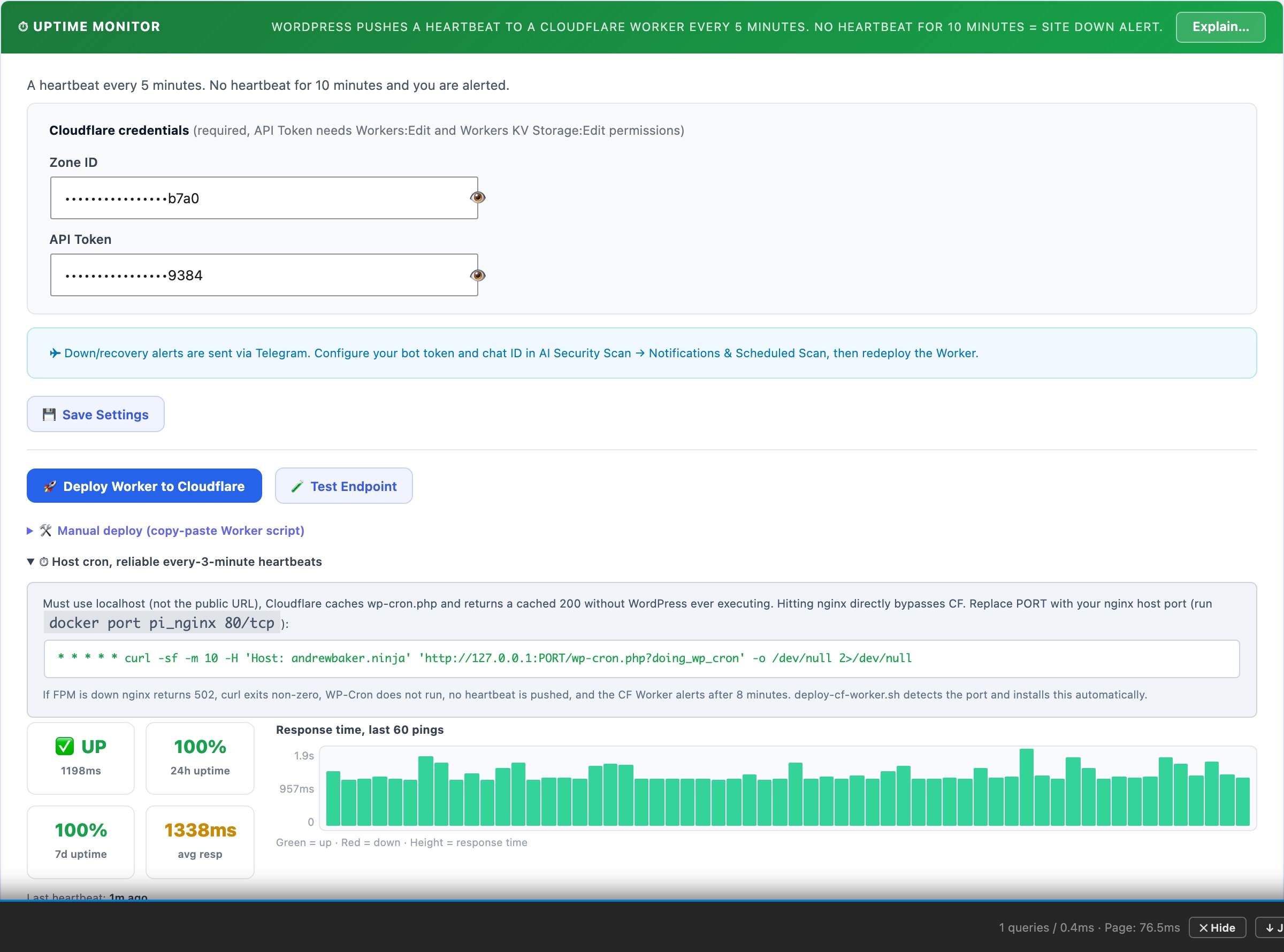
Deploys a Cloudflare Worker that probes a deep readiness endpoint every 60 seconds from the Cloudflare edge. Unlike basic uptime monitors that only check for a 200 response, this endpoint verifies database connectivity, PHP-FPM worker saturation, and WordPress boot. Alerts fire via push notification even if your server is completely offline.
⏱ Deep Uptime Monitoring, From the Cloudflare Edge
Traditional uptime monitors check whether your site returns a 200 status code. That tells you nothing about whether WordPress is actually healthy, your site can return 200 while the database is failing, PHP-FPM workers are exhausted, or the application is silently broken.
The CloudScale Uptime Monitor probes a built-in readiness endpoint every 60 seconds from the Cloudflare edge. Each probe checks: database connectivity, PHP-FPM saturation, and WordPress boot. If any check fails, you get an alert immediately, even if your server is completely offline.
How It Works
- A Cloudflare Worker runs on a 60-second cron from the Cloudflare edge, completely independent of your server, your hosting provider, and WP-Cron.
- Every minute, the Worker sends a
GETrequest to your site’s readiness endpoint (/wp-json/csdt/v1/ready) with a secret Bearer token in the Authorization header. - The readiness endpoint runs three checks internally and returns
HTTP 200if all pass orHTTP 503if any fail. - The Worker posts the result back to your WordPress site, recording it in the uptime history and triggering alerts if the site is down.
- The uptime panel shows Last Queried (last time Cloudflare successfully called your endpoint) and Last Failed Query (last time someone called with an invalid token) so you can see at a glance that the Worker is running and no unauthorised probing is happening.
The Readiness Endpoint
The readiness endpoint is a public REST API route at /wp-json/csdt/v1/ready. It requires a Bearer token, requests without a valid token return 401 Unauthorized and the timestamp is logged as “Last Failed Query”.
Checks performed on each probe:
- Database, executes
SELECT 1against your WordPress database. Fails if the DB is unreachable or returning errors. - PHP-FPM saturation, reads the
/fpm-statuspage (if configured) and fails if active workers exceed 90% of total pool size. This catches the scenario where your site is technically reachable but is about to freeze under load. - WordPress boot, implicit: if the endpoint responds at all, WordPress initialised successfully.
Response format (200, healthy):
{
  "ok": true,
  "checks": {
    "db":  { "ok": true, "message": "Connected" },
    "fpm": { "ok": true, "active": 2, "total": 10, "saturation_pct": 20 },
    "wp":  { "ok": true, "version": "6.8" }
  },
  "site": "https://yoursite.com",
  "checked_at": 1745000000
}
Response format (503, degraded):
{
  "ok": false,
  "checks": {
    "db":  { "ok": false, "message": "Query failed" },
    "fpm": { "ok": false, "active": 10, "total": 10, "saturation_pct": 100 },
    "wp":  { "ok": true, "version": "6.8" }
  },
  "site": "https://yoursite.com",
  "checked_at": 1745000000
}
You can call this endpoint manually at any time (with the token) to check your site’s health.
One-Click Setup
Prerequisites: a Cloudflare account with your site’s domain proxied through Cloudflare. Enter your Cloudflare Zone ID and API Token in the Thumbnails tab, the token needs Workers:Edit permission.
- Go to Tools → Cyber and Devtools → Optimizer tab.
- Scroll to the Uptime Monitor section.
- Optionally enter an ntfy.sh alert URL (e.g.
https://ntfy.sh/your-topic) to receive push notifications on your phone when the site goes down. This is the same ntfy URL used by the scheduled security scan. - Click Deploy Worker to Cloudflare. The plugin will:
- Generate a secure random token (or reuse an existing one)
- Resolve your Cloudflare account ID from your Zone ID
- Upload the Worker script with all environment variables pre-configured (SITE_URL, PING_URL, READY_URL, PING_TOKEN, NTFY_URL)
- Set the cron trigger to run every minute
- Within 60 seconds, the Last Queried timestamp in the status panel will update, confirming the Worker is running and probing your endpoint.
That’s it. No command line required.
Manual Setup (CLI)
If you prefer Wrangler, click Generate Token first, then expand Manual deploy. You’ll get a worker.js file and a pre-filled wrangler.toml with all variables set. Run:
npm install -g wrangler
wrangler login
wrangler deploy
Then set the cron trigger in the Cloudflare dashboard: Workers → cloudscale-uptime → Triggers → Cron Triggers → Add Cron → * * * * *
Alerts and Notifications
- ntfy.sh push, sent directly from the Cloudflare Worker when the readiness probe fails. This fires even if your server is completely offline, because the Worker runs on Cloudflare’s infrastructure independently.
- Email alert, sent from WordPress when the ping callback receives a down status. Falls back to the WordPress admin email if no specific alert email is configured.
- Recovery alert, sent when the site comes back up after a confirmed outage, including how long the site was down.
- 5-minute alert cooldown, prevents notification spam during extended outages.
Security
The readiness endpoint is public (accessible without a WordPress login) but protected by a Bearer token. All token comparisons use hash_equals() to prevent timing attacks. Requests with a missing or incorrect token return 401 and log the time of the attempt as Last Failed Query, visible in the uptime panel. If you see unexpected failed queries, regenerate your token using the Generate Token button and re-deploy the Worker.
The endpoint does not expose sensitive data, it only returns health check pass/fail status and version numbers.