← CloudScale Plugin Help/CloudScale Cyber and Devtools: Free WordPress Security, AI Penetration Testing & Developer Toolkit
Test Account Manager
Creates dedicated WordPress test users for Playwright and automated testing. Provides a session API that generates temporary admin cookies without triggering 2FA, so your test suite can log in as a real administrator without disabling the two-factor authentication protecting your live site.
🤖 Playwright Testing on a Live Site Without Disabling 2FA
Automated end-to-end testing with Playwright requires logging in as a real WordPress user. But if 2FA is enabled on your admin accounts (which it should be), your test suite cannot log in using a username and password alone. The standard workarounds, disabling 2FA for testing, creating a permanent admin account with weak credentials, or patching the login flow, all introduce real security risks on your production site.
The Test Account Manager solves this properly. It creates dedicated test users with real WordPress roles, and provides a session API that generates temporary authenticated cookies without going through the login flow at all. Your 2FA stays active. Your live admin accounts are never touched. Your test suite gets a real session it can use, and the session is invalidated when the test run finishes.
The mechanism works through a server-side session API: a secret-protected REST endpoint that accepts a role name and TTL, then returns a set of WordPress authentication cookies issued directly by the server for a designated test user. The cookies are indistinguishable from a real browser session, so Playwright can inject them and access the WordPress admin as a fully authenticated user. No login page, no password, no 2FA prompt. The session expires after the configured TTL and can be explicitly invalidated at the end of a test run via the logout endpoint.
Test users are real WordPress accounts using standard WordPress roles (Administrator, Editor, Author, Subscriber, etc.). They are named with a unique identifier so they are clearly recognisable as test accounts and are never confused with real user accounts. One session API endpoint serves all test users, the caller specifies which role to get a session for in the request body, authenticated by the shared secret.
The Four-Step Flow
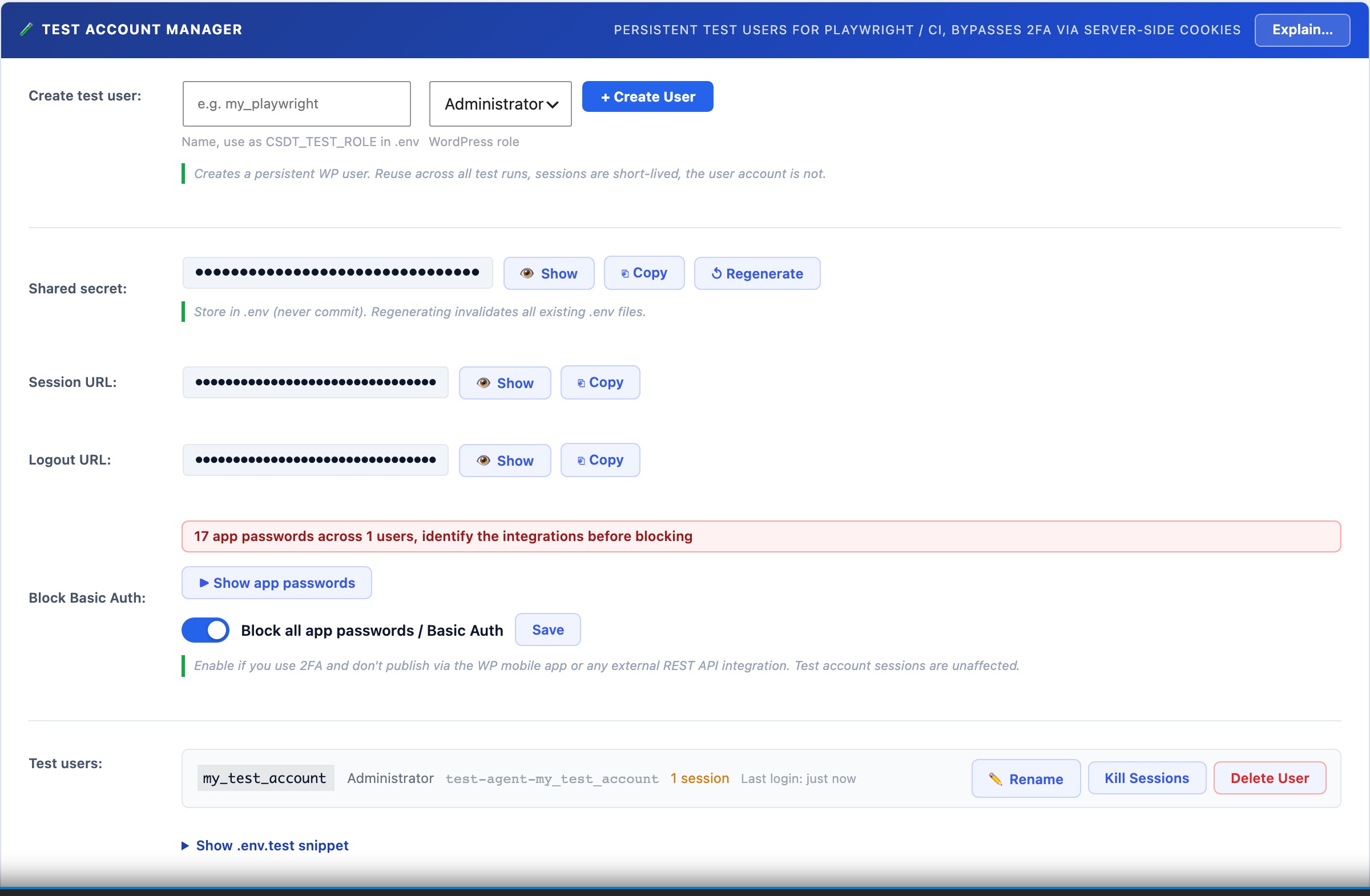
- Create a test user: enter a name (e.g.
my_playwright), choose the WordPress role the tests need (default: Administrator), and click + Create User. CloudScale creates a WordPress user account namedcsdt-playwright-my_playwrightwith a randomly generated password you never need to know. The user appears in your test users list immediately. - Configure your .env.test file: copy the pre-filled snippet from the panel. It contains your site URL, the shared secret, the role name, and the session and logout endpoint URLs. Store this file in your project root and load it in your Playwright config with
dotenv. Never commit the shared secret to version control. - Call the session API in your tests: at the start of your test suite, POST to the session endpoint with the shared secret and role name. The API returns WordPress authentication cookies. Inject them into a Playwright browser context. Your tests now run as a fully authenticated WordPress user. The Playwright helper code is shown in the .env.test snippet section below the user list.
- Log out when done: at the end of your test suite (in an
afterAllhook), POST to the logout endpoint with the same secret and role. The session is invalidated server-side. The test users list shows active session counts so you can verify cleanup worked.
Settings and Controls
- Name: a short identifier for this test user (e.g.
playwright,e2e_admin,ci_editor). The actual WordPress username will becsdt-playwright-{name}to make test accounts identifiable in the Users list. - WordPress Role: the role this test user will have. Choose the minimum role your tests actually need. If you are testing editor-only flows, create an Editor account rather than an Administrator to limit the blast radius if the shared secret is ever leaked.
- Shared Secret: a randomly generated 32-character secret used to authenticate all API requests. Click Show / Hide to reveal it for copying. Click Regenerate to issue a new secret, all .env.test files using the old secret will need to be updated. The secret is stored in your WordPress database and is never transmitted in an API response (only used to authenticate incoming requests).
- Session URL: the POST endpoint for obtaining a session. The URL contains a 32-character random path token so it is not guessable. Each request must also include the shared secret in the POST body. Copy the URL with the copy button.
- Logout URL: the POST endpoint for invalidating a session. Call this in your test suite’s afterAll hook. Accepts the shared secret and role, and optionally a specific session token to invalidate a single session rather than all sessions for that user.
- Active sessions: each test user row shows the number of currently live sessions, colour-coded amber when non-zero. Click Kill Sessions to manually invalidate all sessions for a user without calling the logout endpoint, useful during development when you want to force a fresh session.
- Last Login: the timestamp of the most recent session creation via the API for that test user. Shows relative time (e.g. “5m ago”) for recent activity and the date for older entries.
- Delete User: permanently removes the WordPress test account. Any active sessions are also invalidated. Cannot be undone.
The .env.test Snippet
The panel generates a ready-to-use .env.test file snippet based on your current configuration. Copy it into a file at the root of your test project:
WP_SITE=https://yoursite.com
CSDT_TEST_SECRET=your_secret_here
CSDT_TEST_ROLE=my_playwright
CSDT_TEST_SESSION_URL=https://yoursite.com/wp-json/csdt/v1/test-session-{token}
CSDT_TEST_LOGOUT_URL=https://yoursite.com/wp-json/csdt/v1/test-logout-{token}
Load this in your Playwright config with require('dotenv').config({ path: '.env.test' }) and access the values as process.env.CSDT_TEST_SECRET etc.
Security: what is and is not protected
The session endpoint is publicly accessible (no WordPress login required) but requires both the shared secret in the POST body AND the correct path token in the URL. An attacker would need to know both the secret and the path to request a session. Keep the .env.test file out of version control (.gitignore it) and regenerate the shared secret if you suspect it has leaked.
Test sessions created via the API are real WordPress sessions with full role permissions. Keep TTLs short (1200 seconds is the recommended default for most test runs) and always call the logout endpoint at the end of your suite. The test users list shows active session counts so you can spot stale sessions and kill them manually.