← CloudScale Plugin Help/CloudScale Cyber and Devtools: Free WordPress Security, AI Penetration Testing & Developer Toolkit
AI Cyber Audit
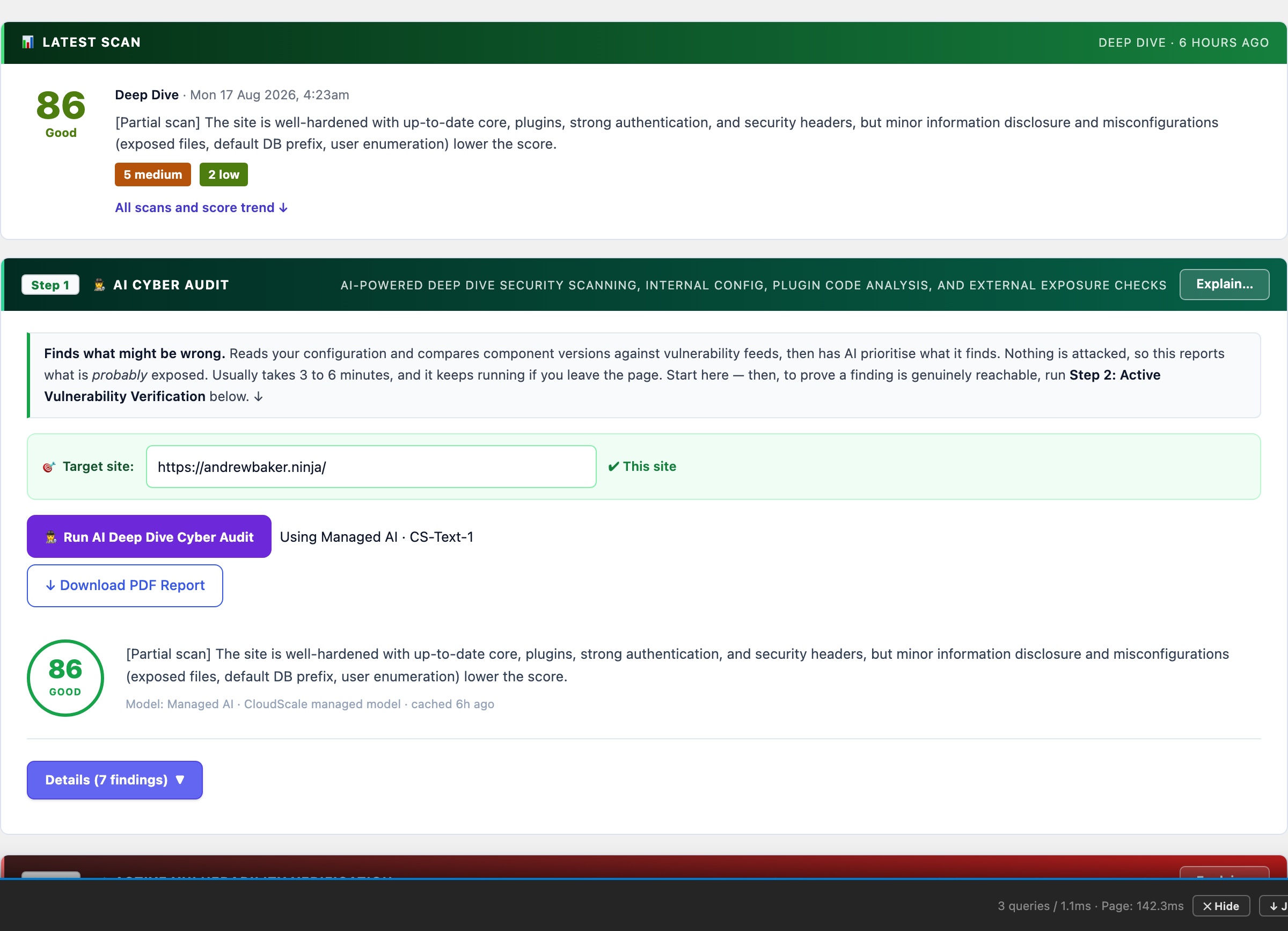
Uses frontier AI, Anthropic Claude or Google Gemini, to analyse your entire WordPress installation and return a prioritised, scored security report in under 60 seconds. Unlike signature-based scanners, the AI reasons from first principles: it reads your actual configuration and code, identifies risk combinations no database can match, and gives you specific fix steps for your exact setup.
🛡️ A Security Consultant in Your WordPress Dashboard, for Free
A professional WordPress security audit costs $500 to $5,000 and takes days to schedule. Generic security checklists from free plugins tell you what to check but not what it means for your specific site. CloudScale connects directly to the world’s most capable AI models: Anthropic Claude Sonnet 5 and Google Gemini. It analyses your entire WordPress installation and delivers a scored, prioritised report with specific remediation steps in under 60 seconds. The same class of AI used by enterprise security teams, working on your site.
Wordfence Premium costs $119/year. Sucuri costs $199/year. WPScan costs $25 to $75/month. These tools run signature-based scans; they match known patterns against a database. They cannot identify novel threats, unusual configuration combinations, or the specific risk profile of your setup. CloudScale’s AI audit reasons from first principles: it reads your actual configuration, your actual code, and delivers findings that are specific to you, not generic checklist items.
Standard Scan audits WordPress core settings, active plugins and themes, user accounts, file permissions, and wp-config.php hardening constants. The AI scores each finding Critical / High / Medium / Low and gives you specific steps to fix it: not generic advice, but instructions for your exact configuration.
Deep Dive Scan adds live probes your site’s security team would run manually:
- Static PHP code analysis of every active plugin, flagging
eval(), shell execution functions, code obfuscation, and suspicious patterns that malware authors use - Live HTTP probes: open directory listing, weak TLS (SSLv3, TLS 1.0), CORS misconfigurations, server version header leaks
- DNS security checks: SPF strictness, DMARC policy strength, DKIM probes (skipped entirely for domains with no MX records, so there are no false positives for non-email sites)
- CSP quality analysis: flags
unsafe-inline,unsafe-eval, wildcard sources, and missing directives in your Content Security Policy - SSH hardening: probes port 22, reads sshd_config, checks for fail2ban; unprotected SSH is marked CRITICAL because it is actively used to recruit servers into DDoS botnets
- AI Code Triage: the 10 highest-risk static findings are sent to the AI with surrounding code context; each is classified as Confirmed Threat / False Positive / Needs Review before the main audit runs
Quick Fixes appear above the scan results, providing one-click remediations for the most common misconfigurations. Each shows green (done) or amber (needs attention) at a glance.
Scheduled Scans run automatically on a daily or weekly schedule with email and push notifications (ntfy.sh supported), so you know about problems before your users or Google do.
Setting Up Your AI Provider
You need one API key to use the AI Cyber Audit. Google Gemini has a free tier with no credit card needed. Anthropic Claude requires a credit card but delivers the deepest analysis. Either works; both are excellent.
Option A: Google Gemini (Free, No Credit Card)
Google AI Studio’s free tier gives you access to Gemini 2.0 Flash with generous daily limits, more than enough for daily WordPress security scans. No billing setup required. This is the recommended starting point if you’ve never used an AI API before.
- Go to aistudio.google.com/app/apikey
- Sign in with your Google account
- Click “Create API key” and select any Google Cloud project (or create a new one)
- Copy the key; it looks like
AIzaSy... - In WordPress: Tools → Cyber and Devtools → Security tab → AI Settings
- Select Google Gemini as provider, paste your key, select model, click Save
Free tier limits: Gemini 2.0 Flash gives you 15 requests/minute, 1,500 requests/day, and 1 million tokens/day. A standard WordPress scan uses approximately 3,000 to 8,000 tokens. You can run dozens of scans per day at no cost.
Want Gemini 1.5 Pro? That model requires a paid Google AI Studio account. Go to aistudio.google.com, click your account, then Billing, and enable pay-as-you-go. Gemini 1.5 Pro costs approximately $0.01 to 0.03 per scan.
Option B: Anthropic Claude (Deepest Analysis, Credit Card Required)
Claude Sonnet 5 and Opus 4.8 deliver the most thorough security reasoning available. Anthropic does not offer a free tier, but the cost is minimal: a deep dive audit with Claude Opus 4.8 typically costs $0.05 to 0.15. An entire month of daily scans with Claude Sonnet 5 costs under $1.
- Go to console.anthropic.com and create an account
- Go to Settings → Billing and add a credit card
- Add an initial credit ($5 is plenty to get started and covers hundreds of standard scans)
- Go to Settings → API Keys and click “Create Key”
- Give it a name like “WordPress Security” and copy the key; it looks like
sk-ant-api03-... - In WordPress: Tools → Cyber and Devtools → Security tab → AI Settings
- Select Anthropic Claude as provider, paste your key, select model, click Save
Model guide: claude-sonnet-5 is fast and excellent for standard scans and daily scheduling. claude-opus-4-8 is the most capable model available and is recommended for deep dive scans and critical sites. Use Auto mode in the plugin to let it pick the right model for each scan type.
⚡ Setting Up Automatic Top-Ups (Anthropic)
If you use scheduled daily scans with Claude, your credit balance will gradually decrease. Automatic top-ups ensure your scans never fail due to an empty balance. Anthropic recharges your account automatically when it drops below a threshold you set.
- Go to console.anthropic.com/settings/billing
- Scroll to “Automatic recharge”
- Toggle it on
- Set “Recharge when balance falls below” to $2 (works well for moderate usage)
- Set “Recharge amount” to $10 (covers several months of daily scans)
- Click Save
Tip: Anthropic sends email receipts for each top-up. Set a usage budget alert at Settings → Limits (e.g. $5/month) so you get notified if usage spikes unexpectedly.
⚡ Setting Up Spend Alerts (Google Paid Tier)
If you upgrade to Gemini 1.5 Pro on Google’s pay-as-you-go tier, Google bills your card automatically as you use the API, with no manual top-up process. Usage is charged to your linked payment method at the end of each billing period.
- Go to console.cloud.google.com/billing
- Select your project, then click Budgets & Alerts
- Click “Create Budget”
- Set a monthly budget (e.g. $5) and email alert thresholds at 50%, 90%, and 100%
- Click Save and Google will email you if spend approaches your limit
Note: Google does not cut off API access when a budget alert fires; it only sends a notification. To hard-cap spend, enable the “Actions” option in the budget and select “Disable billing” (use cautiously, as this will break any Google Cloud services in the project).