← CloudScale Plugin Help/CloudScale Cyber and Devtools: Free WordPress Security, AI Penetration Testing & Developer Toolkit
Visitor IP Source
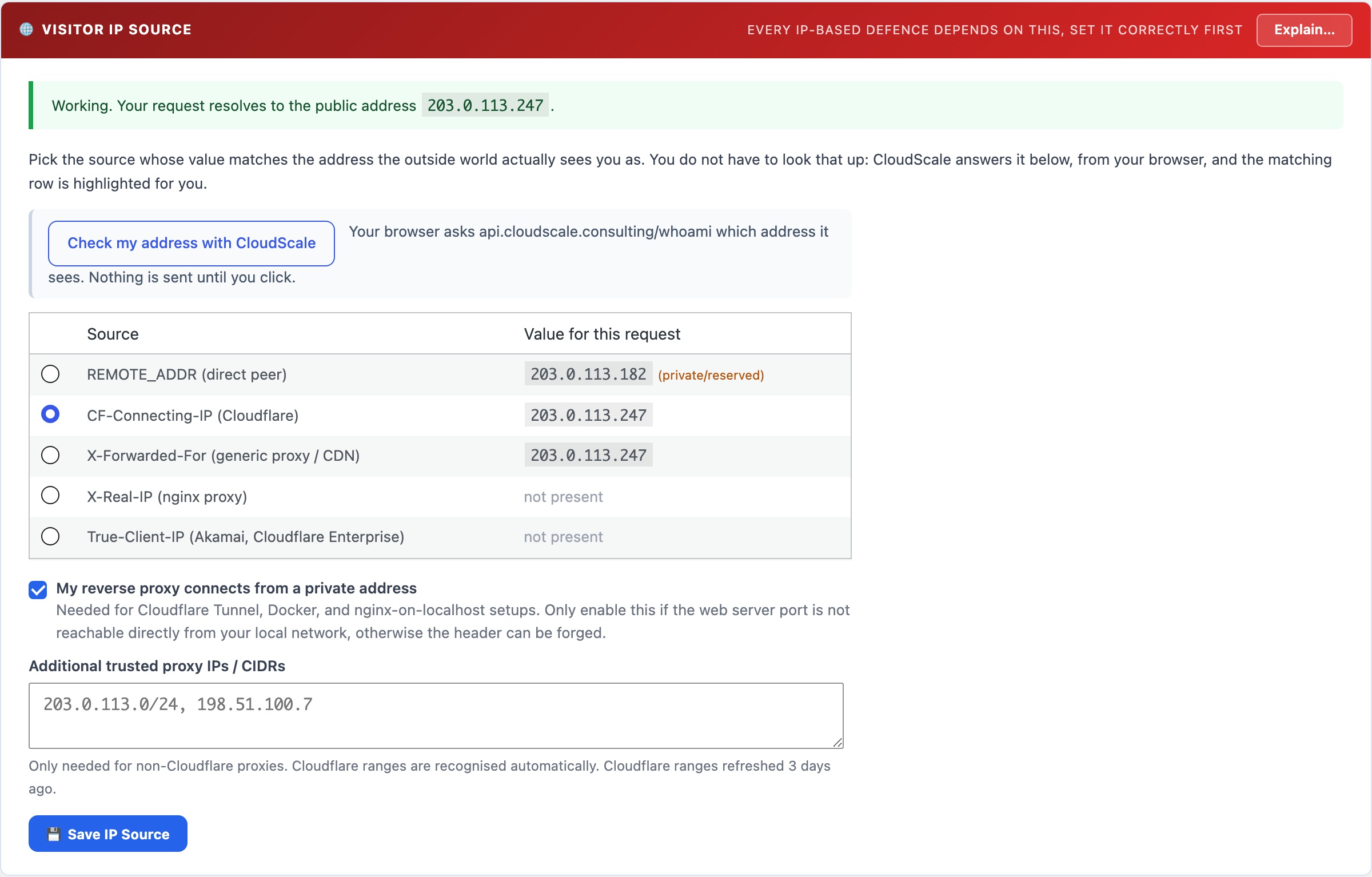
The setting every other IP-based defence depends on. Tells the plugin how your site receives visitor IP addresses, direct, or forwarded by Cloudflare, a CDN, or a reverse proxy. Includes a detection table showing what each candidate source resolves to for your current request, so you can verify the choice instead of guessing.
🌐 Set This First, Everything Else Depends On It
Brute-force lockouts, the IP blocklist, automatic blocking, rate limits, and every attack alert all identify visitors by IP address. If the plugin cannot see real visitor IPs, none of those things throw an error. They go silently blind, and your dashboards show a reassuring zero.
That is the worst failure mode a security tool can have: it looks like nothing is attacking you, when the truth is that nothing is being recorded.
Why IP Detection Breaks
When a visitor connects straight to your web server, PHP reads their address from REMOTE_ADDR and it is simply correct. Nothing to configure.
The moment anything sits between the visitor and WordPress, that stops being true. Cloudflare, a CDN, a load balancer, a reverse proxy, a Docker network, or a Cloudflare Tunnel all terminate the visitor’s connection and open a new one to your site. From WordPress’s point of view the visitor is now the proxy. REMOTE_ADDR becomes the proxy’s address, and the real visitor IP is only available in an HTTP header the proxy adds, CF-Connecting-IP, X-Forwarded-For, X-Real-IP or True-Client-IP, depending on which proxy it is.
Two ways it goes wrong, and they are opposites.
Ignoring the header when there IS a proxy → blindness. Every request appears to come from one address, the proxy’s. Attack counters attribute everything to that single IP. Worse, if the proxy reaches your site over a private address (very common with Docker and Cloudflare Tunnel, e.g. 172.20.0.1), the plugin refuses to record the event at all, because a private address can never be a real internet visitor. The attack is not mislabelled, it is discarded.
Trusting the header when there is NO proxy → a spoofing hole. Headers are just text a client can send. On a directly-connected site, an attacker who sets X-Forwarded-For: 1.2.3.4 would be recorded as 1.2.3.4, and could walk straight past every block, lockout, and rate limit by changing it on each request.
This is why the plugin cannot simply guess. A site genuinely cannot tell from the inside which situation it is in, so you confirm it once, using real values from a real request.
How to set it
- The panel shows a table of every candidate source and what each one contains for your current request.
- Find your own public IP. Visiting cloudflare.com/cdn-cgi/trace is the most reliable way, as it reports the address Cloudflare itself sees.
- Select the source whose value matches your public IP. If only
REMOTE_ADDRmatches, you are directly connected, keep the default. - Save. The banner at the top of the panel turns green and confirms the address you now resolve to.
A surprise worth knowing about: your public IP may not be what you expect. Corporate networks, VPNs, and zero-trust gateways (Zscaler, for instance) route your traffic through their own egress addresses, so the IP your site sees is your employer’s proxy, not your broadband connection. Different sites can even see different addresses for you depending on the route. This is exactly why the table shows live values rather than asking you to reason about your setup.
The security rule behind the scenes
A forwarded header is only ever honoured when the connection actually came from a recognised proxy. Cloudflare’s published ranges are built in and refreshed from Cloudflare weekly, so a stale list cannot quietly break your setup. Behind a different CDN or load balancer, add its addresses or CIDR ranges to the trusted-proxy field.
The one case that cannot be verified by address is a proxy that reaches WordPress over a private address, which is how Cloudflare Tunnel, Docker, and nginx-on-localhost all work. There is no way to distinguish that hop from someone on your LAN forging the header, so it requires an explicit opt-in. Only tick it once you have confirmed your web server port is not reachable directly from your local network.
Why this is a plugin setting, not a server config change
You can fix this at the web server instead, nginx’s real_ip module rewrites REMOTE_ADDR before PHP ever sees it, which is arguably cleaner. But it only helps if you run nginx and have server access. Apache, LiteSpeed, and IIS need entirely different directives, and anyone on shared hosting has no server access at all. Handling it in the plugin means the fix works on every WordPress installation, which is the only standard worth shipping.