← CloudScale Plugin Help/CloudScale Cyber and Devtools: Free WordPress Security, AI Penetration Testing & Developer Toolkit
Home Dashboard
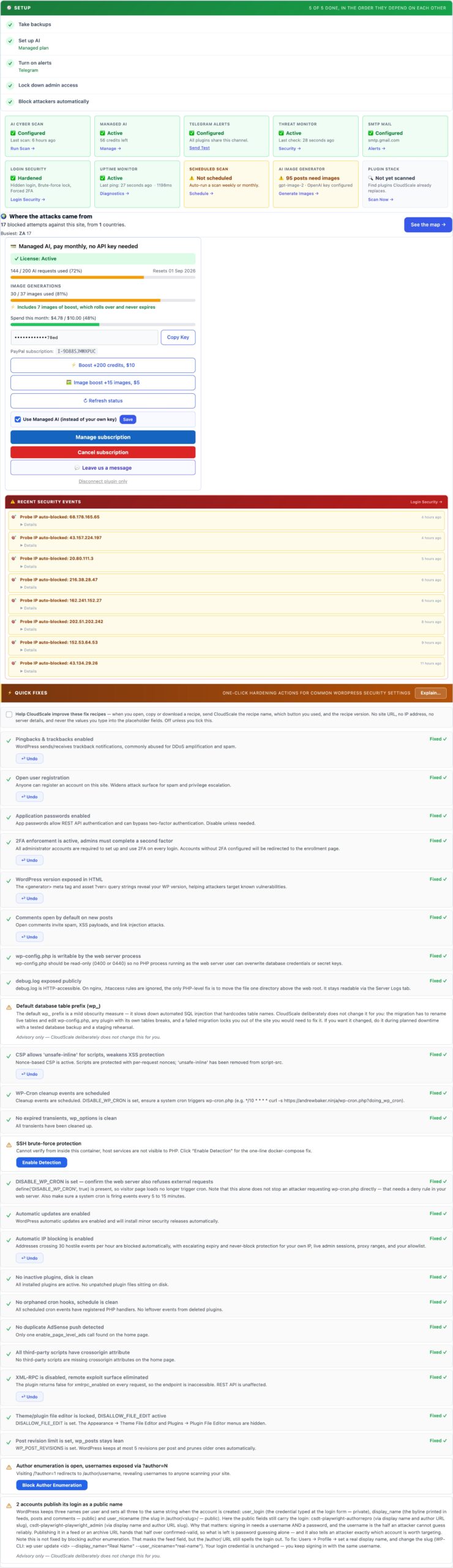
The Home tab is the starting point for every CloudScale session. Configure your AI provider and API key here, enable scheduled background scans, and set up email and push alert notifications. Everything in the plugin, the AI Cyber Audit, site audit, and debugging tools, flows from the credentials you enter on this tab.
Start Here: Configure Your AI Provider
Every CloudScale AI feature, the security audit, site audit, and code analysis, runs through the AI provider you configure on this tab. You supply your own API key; your data goes directly from your server to the provider with no CloudScale middleman.
AI Provider Setup
Two providers are supported. Both work equally well for security audits; the choice depends on your preference and budget:
- Anthropic Claude, the recommended choice for the most capable security analysis. Claude Opus 4.8, Claude Sonnet 5 and Claude Haiku 4.5 are available. Get your key at console.anthropic.com. Paid plans required (no free tier).
- Google Gemini, includes a free tier with no credit card required, making it the zero-cost entry point. Gemini 2.0 Flash (free) and Gemini 1.5 Pro (paid) are available. Get your key at aistudio.google.com.
After entering your key, click Test Key to verify it works before running a scan. The key is stored in your WordPress database (wp_options) and is never transmitted to CloudScale’s servers, it goes only to the provider’s API endpoint during scans.
Scheduled Scans
Enable scheduled scans to run the AI Cyber Audit automatically on a daily or weekly schedule. When a scan completes, results are saved to scan history on the Security tab. Enable email and push alerts to receive the AI summary in your inbox or on your phone the moment a scan finishes.
- Frequency: daily or weekly. Daily is recommended for production sites with regular plugin updates or content changes.
- Scan type: Standard (fast, covers WordPress config and plugin CVEs) or Deep Dive (adds live HTTP probes, DNS checks, and PHP code analysis).
- Email alert: sends to the site’s admin email address by default. Configure SMTP on the Mail tab first to ensure reliable delivery.
- ntfy.sh push: enter any ntfy.sh topic URL to receive instant push notifications on your phone. Free and open-source. No account required, just install the ntfy app and create a topic.