← CloudScale Plugin Help/CloudScale Cyber and Devtools: Free WordPress Security, AI Penetration Testing & Developer Toolkit
Edge Gateway (Enterprise)
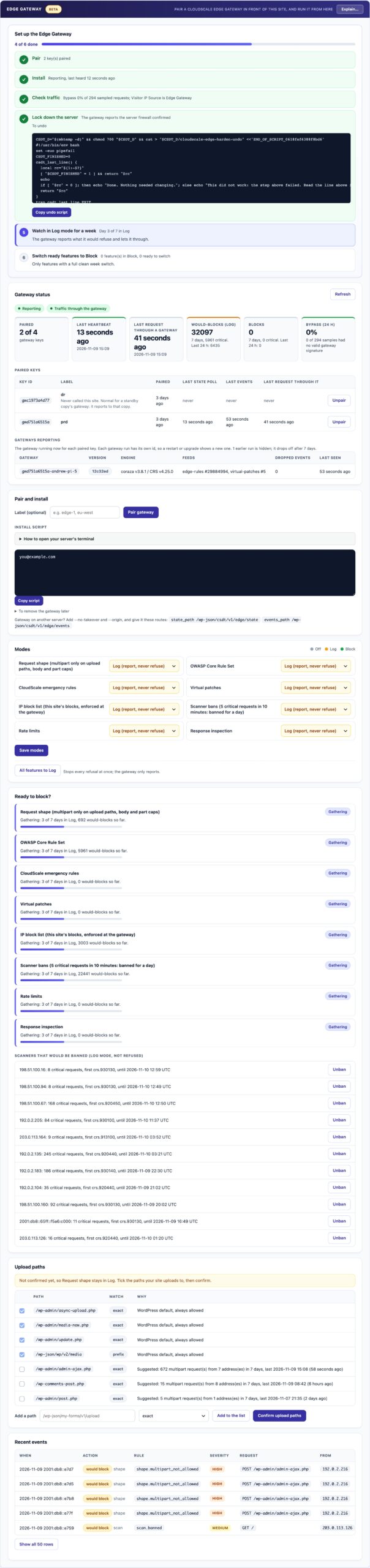
For enterprise clients. CloudScale Edge Gateway is a separate, paid component that runs in front of your web server, before PHP starts, and blocks attacks a plugin cannot reach. This panel pairs it and controls it. Sites without a gateway lose nothing: the plugin stays complete on its own.
🏢 For Enterprise Clients: Protection Before PHP Starts
CloudScale Edge Gateway is a separate, paid component for organisations that need more than any WordPress plugin can give. It runs in front of your web server and checks every request before PHP starts. This panel is its control room: you pair the gateway here, choose what it does, and see what it stopped. It is not part of the free plugin, and the plugin loses nothing without it.
Why a Plugin Is Not Enough
A plugin runs inside PHP, after PHP has already accepted and read the request. Some attacks happen before that point, so no plugin, ours included, can stop them:
- Attacks on PHP itself. Flaws in PHP’s request handling fire before WordPress loads. In October 2026, two critical PHP flaws (php2shell) worked this way.
- Request shape. By the time plugin code runs, PHP has already read the whole body into memory. The gateway limits body size, upload parts and headers before PHP sees them.
- Traffic that never reaches WordPress. Requests for other PHP files and static files bypass every plugin.
What the Gateway Does
- Request shape limits: uploads only on the paths that take uploads, and caps on body size, parts and headers.
- OWASP Core Rule Set (the industry-standard web application firewall rules) with the WordPress exclusions.
- CloudScale emergency rules: signed rules, delivered within minutes of a disclosure, that cover the gap until a fix is released.
- Virtual patches for the plugin and theme versions you have installed, enforced before PHP starts.
- Your IP blocks, enforced at the gateway, with your allowlist respected.
- A report of everything it stopped, sent back into this panel and the activity log.
How It Works With the Plugin
- You run everything from wp-admin. Modes, upload paths and IP blocks are set here; the gateway fetches them every minute.
- Every feature has a mode: Off, Log (report what would have been blocked) or Block. New features start in Off or Log.
- Bypass check. The gateway signs every request it forwards. The panel shows the share of requests that reached your site without going through it, so a server that can be reached around the gateway is visible.
- Site Audit warns if the gateway stops reporting, if requests bypass it, or if it is logging critical attacks it is not yet blocking.
Getting It
The Edge Gateway is installed by hand on a Linux server with Docker, in front of your web server. Installation takes about 30 minutes and changes nothing on your site until you send traffic through it. It is offered to enterprise clients with a CloudScale agreement; to discuss it, contact CloudScale Consulting at cloudscale.consulting/contact.
- In the Edge Gateway panel on the Firewall tab, click Pair gateway and copy the pairing token. It is shown once.
- Run the installer on the gateway server with that token. It checks its configuration before changing anything and confirms the gateway is healthy.
- Send your traffic through the gateway, and leave every feature in Log for 7 days.
- Confirm the upload paths the panel learnt, then switch features to Block one at a time.
What it does not claim
The gateway does not replace updating PHP, WordPress, plugins and themes. For php2shell (CVE-2026-109618 and CVE-2026-109619) the only fix is a PHP update; the gateway narrows the attack surface and reports attempts, but we do not claim it detects or blocks those flaws until it has been tested against a known attack.