← CloudScale Plugin Help/CloudScale Site Analytics, Free Privacy-First WordPress Analytics Plugin
Statistics Dashboard
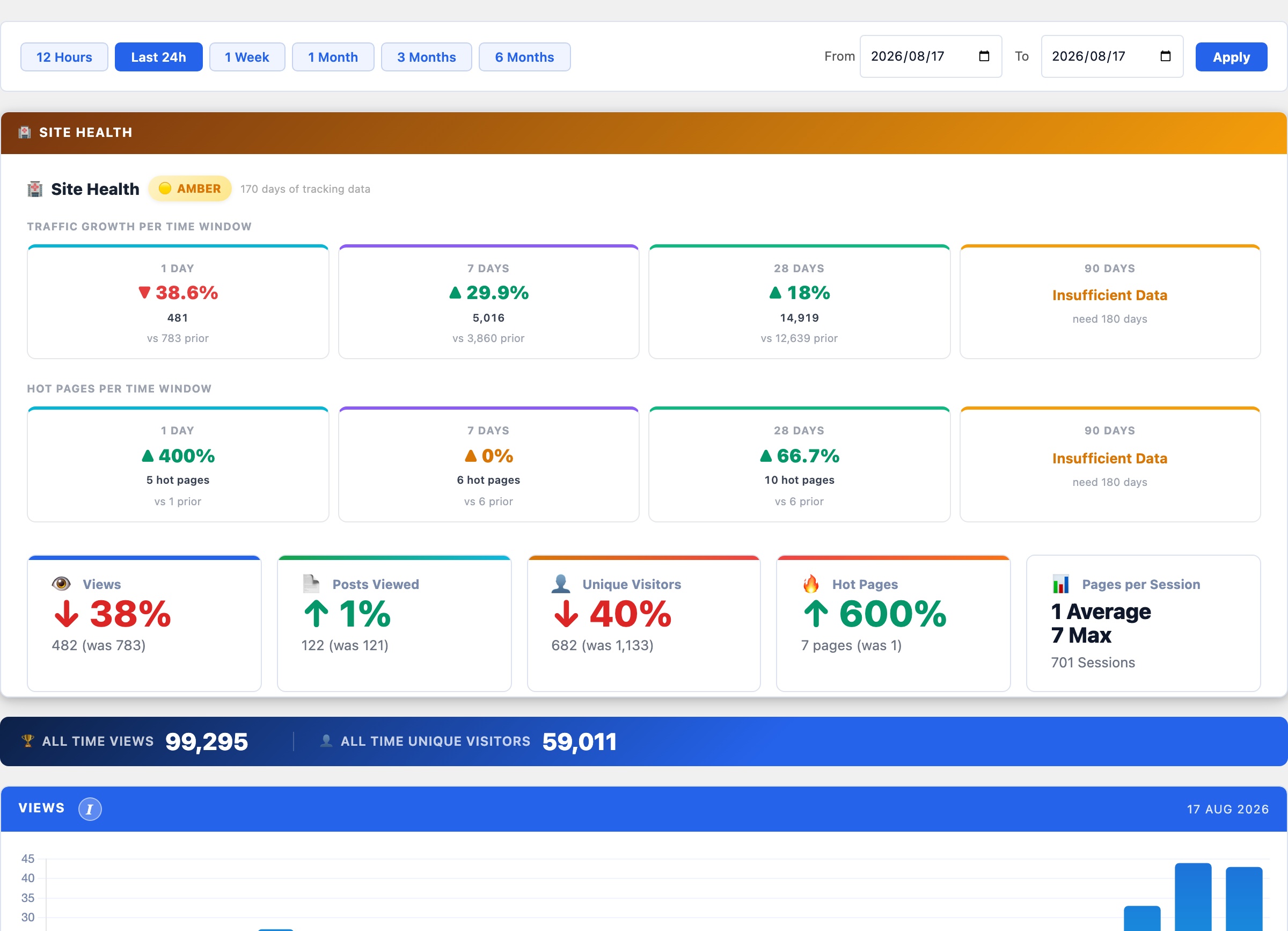
The main analytics dashboard showing site health status, page views over time, top posts, referrer sources, and a Cloudflare cache bypass tester. All data is stored in your own WordPress database with no data sent to any third party.
Why CloudScale Site Analytics?
If your site runs behind Cloudflare, WP Rocket, or any other caching layer, server-side analytics see only the 5 to 20% of requests that reach PHP. Your stats are wrong by a factor of 5 to 10.
CloudScale solves this with a JavaScript beacon that fires after the browser loads the page, regardless of where the HTML came from. The beacon POSTs to a REST endpoint that bypasses the CDN cache, so every real visit is counted. You finally see your actual traffic.
Unlike Google Analytics or Jetpack, your visitor data never leaves your server. No third-party scripts, no tracking pixels, no GDPR headaches from external data processors. IP addresses are hashed before storage; the raw IP is never written to the database.
It is completely free. No premium tier. No per-site fees. Install it, add one Cloudflare Cache Rule, and your stats are accurate from the first pageview.
Site Health
At the top of the Statistics tab, the Site Health panel shows a RAG (Red/Amber/Green) status across four rolling windows, 1 Day, 7 Days, 28 Days, and 90 Days. Each window shows a view count and a percentage change vs the equivalent preceding period: e.g. +12% on 28 Days means 12% more views than the previous 28-day window. Green = growing, amber = flat or slight decline, red = declining. The overall badge summarises all four windows at a glance. Shows Awaiting Data until sufficient tracking history has been collected.
The Statistics Dashboard shows page view data stored directly in your WordPress database across five custom tables (wp_cspv_views_v2, wp_cspv_referrers_v2, wp_cspv_geo_v2, wp_cspv_visitors_v2, wp_cspv_404_v2). No data is ever sent to Google, Facebook, or any external service.
How tracking works: A lightweight beacon.js script fires a POST request to the WordPress REST API endpoint /wp-json/cloudscale-site-analytics/v1/record/{post_id} after the page has fully loaded. Because this is a fresh HTTP request rather than a cached response, it reaches WordPress even when Cloudflare or another CDN is serving the cached HTML page. This is why beacon-based tracking counts every real visit, whereas server-side counters miss 80 to 95% of views on cached sites.
Views, Top Posts and Referrers
- Period selector: switch between Today, 7 days, 30 days, 90 days, and All time. Each period queries the
wp_cspv_views_v2table directly; no aggregation tables are needed. - Totals bar: Total Views, Unique Posts Viewed, and Lifetime totals pulled in a single indexed query on
viewed_at. - Views chart: daily bar chart. Gaps indicate days with zero traffic, not missing data.
- Most Viewed (Period): top posts ranked by view count for the selected period, with direct edit links.
- Referrers: parsed from the
document.referrervalue sent by the beacon and stored inwp_cspv_referrers_v2. Toggle between Sites (referrer domain) and Pages (full referring URL). Direct traffic with no referrer appears as “Direct”. Click any referrer domain to see a Top Pages breakdown: which of your posts and pages that source sent the most traffic to, with view counts and a Copy button.
All Time Top Posts
A separate ranked table showing lifetime view counts across all time, independent of the period selector. Includes imported Jetpack view counts blended with live beacon data if you migrated from Jetpack Stats. Useful for identifying your most valuable evergreen content.
Cloudflare Cache Bypass
An interactive test panel that verifies your Cloudflare Cache Rule is correctly configured to bypass caching for the beacon REST endpoint. Without this rule, Cloudflare caches the REST responses and beacon POSTs fail silently; your view counts appear to record but nothing is actually written.
Required Cache Rule: In your Cloudflare dashboard, go to Caching, then Cache Rules, and create a rule: URI Path contains /wp-json/cloudscale-site-analytics/, Cache Status: Bypass.
Click Test Cache Bypass to send a probe request through the beacon endpoint and check whether the response has the expected headers. A green status badge confirms Cloudflare is bypassing the cache correctly; a red badge means the rule is missing or misconfigured.
Download & Source Code
Direct download (S3): cloudscale-site-analytics.zip, always the latest stable release. Upload via Plugins → Add New → Upload Plugin in wp-admin.
Source code (GitHub): github.com/andrewbakercloudscale/cloudscale-site-analytics, MIT licensed, issues and pull requests welcome.